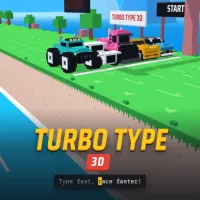
Turbo Type 3D










About Turbo Type 3D
Turbo Type 3D turns keyboard skills into a fast-paced racing challenge. Instead of steering a traditional racing car, your main job is to type words correctly and quickly. Every accurate keystroke helps your vehicle move forward, creating an unusual combination of typing practice and arcade racing.
The 3D presentation makes each race feel more dynamic than a standard typing test. You can watch your vehicle push along the track while your typing speed directly affects its progress. The result is a simple concept with a competitive edge: type faster, make fewer mistakes, and try to reach the finish line ahead of the competition.
Type Faster, Race Further
The core mechanic is straightforward to understand. Words or sequences appear on the screen, and you need to reproduce them using your keyboard. Correct typing keeps your vehicle moving, while mistakes can interrupt your rhythm and cost valuable time.
Because the race depends on both speed and accuracy, blindly typing as quickly as possible is not always the best approach. A steady rhythm can help you avoid errors and maintain consistent progress.
Accuracy Is the Secret to Maintaining Momentum
The most intriguing part of Turbo Type 3D is how it turns an ordinary typing task into a race against time. A few seconds of hesitation can make a noticeable difference, while a clean sequence of correctly typed words can quickly build momentum.
Players who are already comfortable with touch typing may find themselves concentrating on speed, while beginners can use the game to become more familiar with keyboard layouts and common letter combinations. Either way, the racing format gives each typing challenge a clear objective.
To improve your performance, focus on:
- Looking ahead at upcoming words instead of staring at individual letters.
- Keeping a steady typing rhythm.
- Prioritizing accuracy when difficult words appear.
- Avoiding unnecessary pauses between words.
Controls
- Keyboard: Type the words displayed on the screen.
- X key: Correct an incorrect character and unlock your vehicle.
- Tab: Activate Turbo
- Right Arrow: Draft behind a rival vehicle
Similar Games
FAQ
How do you play Turbo Type 3D?
Read the words displayed on the screen and type them as quickly and accurately as possible using your keyboard.
Does typing speed affect the race?
Yes. Faster and more accurate typing allows your vehicle to maintain its progress and compete more effectively.
Is Turbo Type 3D useful for typing practice?
It can provide casual typing practice because players repeatedly enter words while focusing on both speed and accuracy.